You are using an unsupported browser. Please update your browser to the latest version on or before July 31, 2020.
close
You are viewing the article in preview mode. It is not live at the moment.

Our US Offices will be closed on Friday, June 19th in observance of Juneteenth.

We will be operating with reduced staff but still available from 9:00 am - 5:00 pm ET.


We are aware of a popup error that some Users may be receiving when logging into or navigating Elements. Salesforce is currently assessing and pushing a resolution for this.
You can view the status here.

Custom Report Types
print icon

What is a Report Type?

A report type is like a template that makes reporting easier. The report type determines which fields and records are available for use when creating a report. This is based on the relationships between a primary object and its related objects. For example, with the Contacts & Account (Relationship) report type, Contacts is the primary object and Accounts (Relationship) is the related object.

Reports display only records that meet the criteria defined in the report type. Elements provides a set of predefined standard reports, and report types. Don’t see all the fields you want? Your System Administrator might need to create a custom report type.
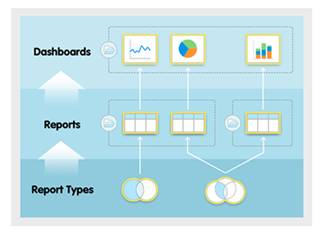
An image showing the relationships between folders, dashboards, reports, and report types


Elements can be customized by your System Administrator, so your views & access may differ from this documentation. Please contact your System Administrator with specific questions.

Feedback
1 out of 1 found this helpful

scroll to top icon